


GoldLab Bollinger Squeeze is a fully automated Expert Advisor for MetaTrader 5. It is designed for XAUUSD (gold) and also runs on other symbols such as EURUSD.
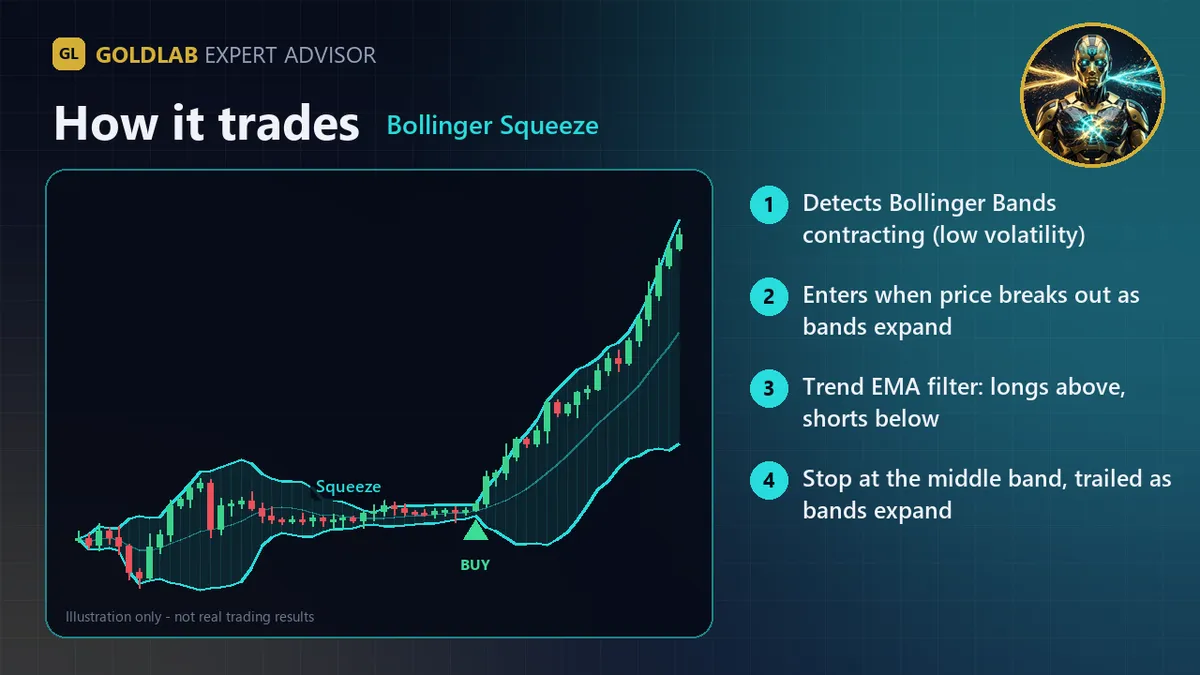
How it trades
- Squeeze detection - volatility is considered compressed when the Bollinger Band width is near its lowest of the last N bars, and/or when the Bollinger Bands sit inside a Keltner Channel (EMA +/- ATR). You choose which definition to use.
- Expansion breakout - within a few bars after a squeeze, a candle must close outside the Bollinger Band (a fresh close, not a bar that was already outside).
- Trend filter - longs only above a rising trend EMA (default 100), shorts only below a falling one. Can be switched off.
- Stop-loss at the Bollinger middle band (with a minimum ATR distance). Optional take-profit at an R-multiple (default 3R; set 0 to exit only by trailing).
- Trailing - on every new bar the stop is moved to the middle band (plus a small ATR buffer) when that tightens it, so trades are held while the expansion continues and closed when price falls back through the middle of the bands.
Risk management (built in)
- Every trade is opened with a stop-loss. There is no martingale, no grid and no averaging down.
- Position size from risk % of balance (default 1%) or a fixed lot; lots are normalised to the broker's min / max / step and reduced if free margin is not enough.
- Daily loss limit: no new trades for the rest of the day once equity is down the set % from the day-start balance.
- Max spread filter, optional trading-hours filter, and no orders while the market is closed or trading on the symbol is disabled.
- Stop-loss / take-profit are always placed outside the broker's stops and freeze levels.
- Works on hedging and netting accounts (on netting accounts it opens only when the symbol has no position).
Inputs and default settings
| Input | Default | Description |
|---|---|---|
| Signal timeframe | Current | Timeframe for all calculations |
| Bollinger period / deviation | 20 / 2.0 | Bollinger Bands settings |
| Squeeze definition | Either | Narrowest width, inside Keltner, or either |
| Width look back / tolerance | 60 / 0.10 | Width within 10% of the lowest of the last 60 bars |
| Keltner multiplier | 1.5 | Keltner = EMA +/- ATR x this |
| Squeeze memory (bars) | 6 | Breakout must come within this many bars of a squeeze |
| Use trend filter / Trend EMA | true / 100 | Trade only with the EMA trend |
| ATR period | 20 | ATR for Keltner and stops |
| Minimum stop (x ATR) | 1.0 | Minimum stop distance |
| Take-profit (R) | 3.0 | 0 = no fixed target, exit by trailing stop |
| Trail on middle band / buffer | true / 0.1 | Middle-band trailing stop |
| Risk per trade (%) | 1.0 | Risk as % of balance, used when Fixed lot = 0 |
| Fixed lot | 0.0 | Fixed lot size (0 = use Risk %) |
| Maximum lot | 10.0 | Upper cap per trade |
| Use minimum lot if risk lot is too small | true | On small accounts trade the broker minimum instead of skipping |
| Magic number | 20271004 | Change it to run several copies on one account |
| Daily loss limit (%) | 3.0 | Stop opening trades for the day at this loss (0 = off) |
| Max spread (points) | 60 | 2-digit gold / 4-digit FX scale (100 = 1.00 USD on gold); 0 = off |
| Restrict to trading hours | false | Optional start / end hour (server time) for new entries |
| Max slippage (points) | 30 | Same scale as spread |
| Show info panel | false | Optional status panel on the chart |
Recommended setup
- Symbol / timeframe: XAUUSD H1 (designed for gold); also FX majors such as EURUSD. Any timeframe from M15 to H4.
- Account: any (hedging or netting), any deposit that allows the broker's minimum lot with a sensible risk %.
- VPS: recommended for uninterrupted operation.
Honest notes
- No trading system can guarantee profit. Past performance, in the tester or live, does not guarantee future results.
- Always test the EA in the MetaTrader 5 Strategy Tester and then on a demo account before using real money, with your broker's own data and spread.
- Session hours are in your broker's server time - check your broker's time zone and adjust the hour inputs if needed.
- Start with a low risk % and use money you can afford to lose.

Plan your risk before you run it
- Check the lot the EA will use for your balance and stop with the XAUUSD lot size calculator and the margin calculator.
- Compare targets and stops with the risk reward calculator.
- How to Set a Stop Loss on Gold (ATR Method)
- Best Timeframe for Gold Trading: Pros and Cons
- Breakout vs Trend Following vs Mean Reversion EA for XAUUSD
FAQ
What is a Bollinger squeeze?
A squeeze is a period of unusually low volatility, when the Bollinger Bands narrow or move inside the Keltner Channel. Quiet periods are often followed by larger moves, and the EA trades the breakout once the bands expand again.
Is there a free demo?
Yes. Every MQL5 Market product has a free demo that runs in the MetaTrader 5 Strategy Tester, so you can test it on your broker's own data before buying.
Does it use martingale, grid or averaging down?
No. Every position is opened with a stop-loss, the lot size comes from your risk % (or a fixed lot), and there is a daily loss limit.
Which broker and account do I need?
Any MetaTrader 5 broker that offers XAUUSD, on a hedging or netting account. A low-spread account and a VPS for 24/5 operation are recommended.
Can this EA guarantee profits?
No. No trading system wins every trade, and backtest or past results do not guarantee future results. Start on a demo account with the default risk.
Trading gold, forex and CFDs is high risk and you can lose your capital. This page is for information only and is not investment advice. Illustrations are not trading results.